Documentation · Concepts
What a brain is made of.
The words the tool uses and what each one means, the seven steps a sync actually performs in order, and what all of it looks like as ordinary files on your own disk.
Read this once and the command reference stops being a list. If you would rather see it working first, the quickstart builds a brain in about ten minutes.
Vocabulary
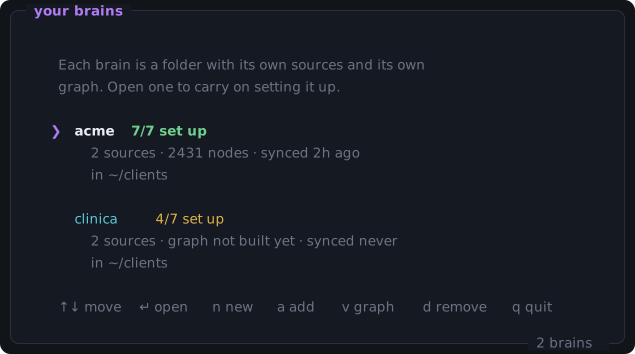
Seven words do most of the work in this documentation, and in the CLI's own output. They are used consistently and mean exactly this.
- brain
- One business or client's knowledge base. An ordinary folder you can back up, copy to another Mac or delete. There is no account and no server behind it.
- source
- A system that feeds a brain — a folder on this Mac, a CRM sub-account, a REST API, a public page.
- connector
- The script that pulls one source in and writes it out as normalized Markdown. One per source, living at
connectors/<name>/sync.py in your own project. - preset
- A connector brainiphy already ships finished for a known system. You supply an account id and a credential; there is no code to write.
- graph
- What graphify builds from the normalized files: the people, companies, deals and documents, and the edges between them. It lives at
graphify-out/graph.json. - sync
- One run of the connectors whose interval has elapsed, plus a graph rebuild if any of them actually ran.
- step
- One of the seven items on a brain's setup checklist.
- skill
- The Claude Code skill brainiphy installs, which lets Claude run the same seven-step playbook on your behalf.
The seven steps
A checklist, not a wizard. brain re-reads the folder every time it draws, so it always knows which steps are already done and puts you on the one you are actually on. You can jump around.
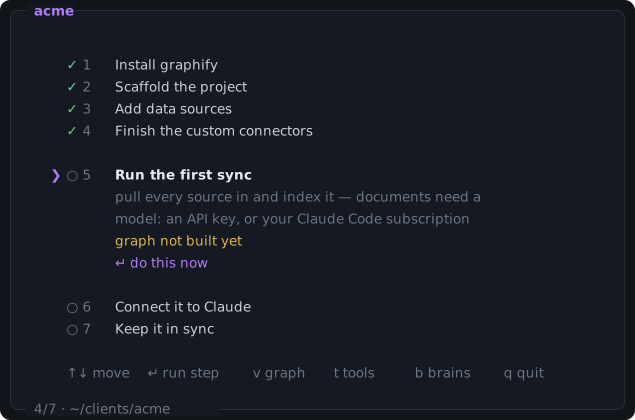
↵ to run the step you’re on. You can also jump: a new brain wants the sequence, but a brain you set up six months ago just needs “add one more source”, and walking it through all seven to get there would be silly.- 1
Install graphify
The engine that turns the collected files into a graph. The installer does this for you.
- 2
Scaffold the project
Creates registry.yaml, .gitignore and .graphifyignore, so the connector scripts are never indexed as content.
- 3
Add data sources
One connector per system that feeds the brain: a folder, a URL, a CRM, an API.
- 4
Finish the custom connectors
Write the fetching for anything generated from a stub, and fill in the account details a preset needs.
- 5
Run the first sync
Pull every source in and index it into a graph.
- 6
Connect it to Claude
So Claude Code, and optionally Claude Desktop, can query the graph.
- 7
Keep it in sync
A LaunchAgent that re-runs brain sync on its own, whether or not a terminal is open.
brain guide prints the same seven steps as text, works out which are done, and gives the exact command for the next one — see step 4 of the quickstart.
A brain on disk
A brain is an ordinary folder. This is everything brain puts in it — nothing is hidden anywhere else on the system except the credentials, which are in the Keychain.
connectors/
├── registry.yaml         # which connectors exist + their type and interval
├── <name>/sync.py        # one script per data source
├── state/<name>.json     # last-run timestamps, drives interval checks
└── logs/                 # LaunchAgent stdout/stderr
raw/<name>/               # connector output — normalized Markdown
graphify-out/graph.json   # the built graph
.graphifyignore           # excludes connectors/ from indexing
.gitignore
registry.yaml is meant to be readable and is safe to edit by hand — a malformed entry is skipped rather than taking down the whole sync. Everything under state/, logs/, raw/ and graphify-out/ is generated and gitignored.