brain
The guided flow, and the front door. Opens on the list of brains this machine knows about; opening one drops you into its checklist. Needs a terminal, because it asks questions — in a script, use the individual commands.
Documentation · Reference
The full reference for the brain CLI, the failures that are quiet rather than loud, and the questions that come up before anyone installs anything.
If a command is not doing what you expect, the troubleshooting table is ordered by how often each one bites rather than by severity.
brain on its own covers everything below. These exist for scripts, for automation, and for when you know exactly what you want. Every one of them takes --help. Output is coloured and tabulated at a terminal and plain when piped, so logs stay clean.
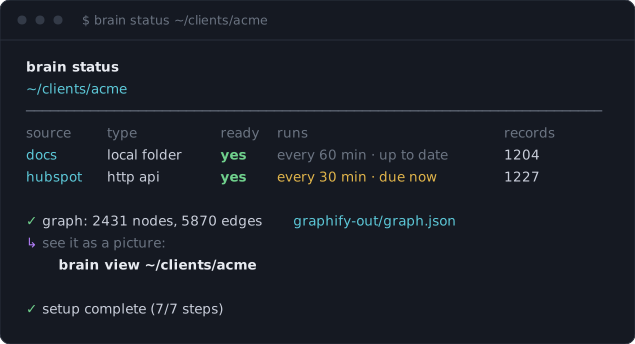
brain status answers “is this thing actually working”: every source, whether it can really run, when it next will, how much it has brought in, and how big the graph is. When a source can’t run, the table says which kind of not-ready it is instead of making you open files to find out.The guided flow, and the front door. Opens on the list of brains this machine knows about; opening one drops you into its checklist. Needs a terminal, because it asks questions — in a script, use the individual commands.
Start a new brain, skipping the list.
Every brain on this machine, as text: setup progress, source count, graph size, last sync and location. A folder that has moved or been deleted is reported as missing rather than quietly dropped.
Register a brain that already exists — one made before the list did, or one that arrived with a cloned repo. At a terminal, run it with no argument to browse for the folder.
Remove a brain from the list and touch nothing inside it. The connectors, the graph and the mirrored documents all stay. brain add puts the entry back.
Prepare a folder to receive connectors: creates connectors/registry.yaml and connectors/state/, appends generated output to .gitignore, and appends connectors/ to .graphifyignore. Never overwrites an existing registry, so it is safe to re-run.
Print the seven steps, work out from the project on disk which are done, and give the exact next command. Read-only, so it is safe to run anywhere — including from an agent that needs to know where a brain stands.
Registered sources — type, whether each can actually run, when it next will, how many records it has pulled in — then the graph size in nodes and edges, and where the setup stands.
List the systems brainiphy ships a finished connector for, and the account details each one needs.
Write connectors/<name>/sync.py and register it in registry.yaml with its type and interval. Existing scripts are never overwritten.
Run every connector whose interval has elapsed, then rebuild the graph — but only if at least one connector actually ran. Prints ran / skipped / errors / graph_rebuilt and exits non-zero if any connector failed.
Open graphify's interactive graph in your browser. If the picture is older than the graph it is redrawn first, which costs no tokens.
Wire the graph into Claude.
Generate a LaunchAgent that runs brain sync <project> --full on an interval. Logs land in connectors/logs/. Refuses to run if the project has no registered connectors.
Store a connector credential in the macOS Keychain, prompting with hidden input. The write is confirmed by reading it back.
Print a stored credential, bare, for piping. Debugging only.
For the parts that change least often — the exact on-disk layout and the connector contract — see a brain on disk and writing a connector above.
These are the failures that are quiet rather than loud — the ones where something reports success and the result is still wrong. Loud errors usually say what they are.
Why
graphify honours .gitignore, and brain init puts raw/ there so mirrored client material is never committed. Without --no-gitignore, graphify skips the whole corpus.
Fix
Use brain sync, which passes the flag for you. If you are calling graphify extract by hand, add --no-gitignore.
Why
The incremental graphify update pass indexes code only. A brain made of documents needs the full extract pass.
Fix
The LaunchAgent brain schedule writes already passes --full. If you wrote your own cron entry, add it.
brain view shows a picture that does not match the graph.Why
graphify extract writes graph.json without redrawing graph.html, so after a full rebuild the picture is the previous one.
Fix
brain view redraws it when it is stale. Run brain view rather than opening graph.html directly.
Why
A stub with no fetching written, and a preset missing its account id, are both present on disk and neither can run.
Fix
brain status names which kind of not-ready it is. brain guide gives the exact command to fix it.
Why
The credential has no scope for those objects. A missing scope can look like an auth failure.
Fix
Probe the generated connector before syncing: it reports which objects the credential can actually read and writes nothing.
Why
macOS security can exit 0 on a write that stored nothing, or that stored a different value.
Fix
brain secret set already reads the value back to confirm it. If you wrote the item another way, re-set it with brain secret set.
brain schedule refuses to run.Why
The project has no registered connectors.
Fix
Add at least one source first. Scheduling a sync loop with nothing to sync is a silent no-op that is confusing to debug later.
Why
connectors/ is missing from .graphifyignore — usually because brain init was skipped on a project that already had a registry.yaml.
Fix
Run brain init on the project. It never overwrites an existing registry, so it is safe.
graphify is the engine that turns a folder of normalized files into a knowledge graph. brainiphy is the layer around it: discovering sources, writing the connectors, keeping them synced, and wiring the result into Claude. Keeping them apart means graphify stays a general graph tool and brainiphy stays replaceable around it. The installer brings graphify in for you.
Two hard dependencies: credentials go in the macOS Keychain, and scheduling is a launchd LaunchAgent. Everything else is ordinary Python. Ports are welcome — it is MIT.
Then it is a REST API, and --api <base-url> generates a connector with the networking already done. You write one function per kind of record — or ask Claude to, since the skill exists for exactly that. If it is not an API at all, the bare template takes one function that returns records.
No. Sources are read locally or from their own APIs and indexed on your machine. The only thing that leaves is what you send when a model indexes your documents — the same trust boundary you already accepted by using Claude.
No. Files are named by a stable slug of each record's remote ID, so a re-sync overwrites in place. Mirrored folders use rsync --delete, so a file removed at the source stops being a node.
Yes — it is a folder. Copy it, and brain add puts it on their list. What does not travel is the credentials, which are in their own Keychain, not in the folder.
No, and this is deliberate. brain forget and the app's d key only remove the entry from the list. The connectors, the mirrored documents and the graph all stay exactly where they are. Deleting them for real is rm.
bash install.sh --uninstall. It removes the virtualenv, the two shortcuts in ~/.local/bin, the marked block in your shell profile, and the skill link. Your brains are your own folders and are left alone.